Air Printer App: Smart PDF2.9
Publisher Description
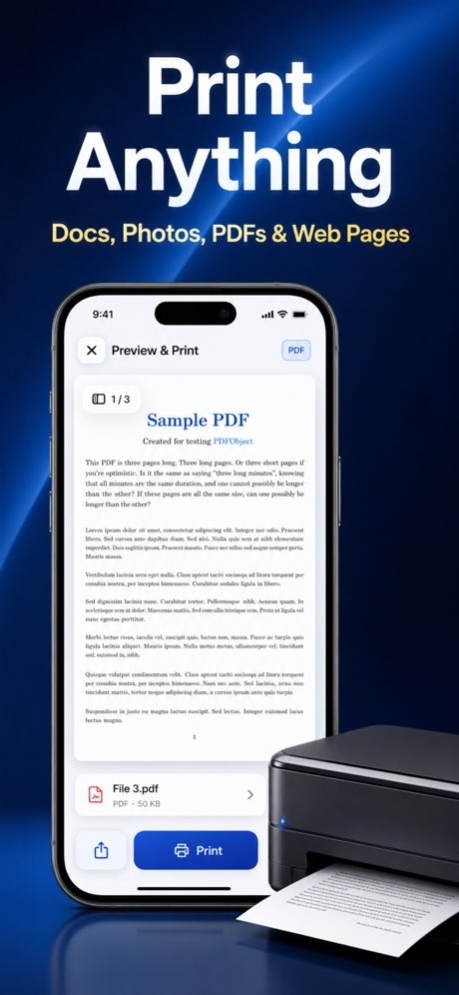


The all-in-one printing app for iPhone and iPad. Print documents, photos, PDFs, web pages, and more wirelessly to over 5,000 AirPrint-compatible printers from HP, Canon, Epson, Brother, Samsung, Xerox, and many other brands.
PRINT ANYTHING FROM YOUR IPHONE & IPAD
Print photos, documents, PDFs, web pages, emails, and contacts in seconds. Supports 20+ file formats including PDF, DOCX, XLSX, PPTX, JPG, PNG, and more. Choose color or black & white, adjust paper size, select number of copies, and customize print settings for perfect results every time.
BUILT-IN DOCUMENT SCANNER
Use your device camera to scan documents instantly. The smart scanner automatically detects edges, corrects perspective, and enhances quality. Scan receipts, contracts, IDs, notes, and any paper document. Save as PDF or print directly.
ADVANCED PDF EDITOR & ANNOTATION
More than just a printer -- annotate PDFs with highlights, notes, and drawings. Add text, signatures, and stamps to any PDF. Edit and organize pages before printing. A complete PDF toolkit right on your device.
OCR TEXT RECOGNITION
Extract editable text from scanned documents and images using powerful OCR technology. Convert paper documents into searchable, editable digital text. Copy, share, or print the extracted text with one tap.
PRINT PHOTOS LIKE A PRO
Print photos directly from your photo library or iCloud. Resize, crop, rotate, and enhance images before printing. Print multiple photos per page, create collages, or print borderless photos in stunning quality.
PRINT FROM ANYWHERE
- Print files from iCloud Drive
- Print web pages by entering any URL
- Print directly from the camera
DOCUMENT CREATION & EDITING
Create and edit text documents right in the app. Use the built-in text editor to write, format, and print documents without needing a computer. Perfect for notes, letters, and quick documents.
WHITEBOARD & DRAWING TOOLS
Sketch ideas, annotate images, and create drawings with the built-in whiteboard. Print your creative work or save it for later. A unique feature you will not find in most printer apps.
SUPPORTED PRINTERS
Compatible with 5,000+ AirPrint-enabled printers from all major brands:
- HP (LaserJet, OfficeJet, DeskJet, ENVY)
- Canon (PIXMA, MAXIFY, imageCLASS)
- Epson (EcoTank, WorkForce, Expression)
- Brother (MFC, HL, DCP series)
- Samsung, Xerox, Lexmark, Ricoh, and more
For the full list of AirPrint-compatible printers, visit: https://support.apple.com/en-us/HT201311
WHY CHOOSE MOBILE PRINT?
- No drivers or additional software needed
- Works with any AirPrint-compatible printer
- All-in-one: print, scan, edit, annotate, OCR
- Clean, intuitive interface designed for everyone
- Regular updates with new features and improvements
Disclaimer
This is an independent app and is not affiliated with any printer manufacturer. AirPrint is a trademark of Apple Inc.
Subscription
Printer App is free to download. Access premium features through a subscription that auto-renews each term, which you can manage via your iTunes account. To prevent auto-renewal, update your settings at least 24 hours before the end of the current term.
We love hearing from our users! Send feedback to: andychung.cc@gmail.com
Terms & Privacy
Terms of Use: https://airprinter.andyrgb.com/terms
Privacy Policy: https://airprinter.andyrgb.com/privacy
Version History What's New
- Share Extension: Print files directly from any app via the Share menu
- Email Printing: Import and print email attachments with ease
- Redesigned Home: New category filters for faster navigation
- Bug fixes and performance improvements 2.9 Jun 8 What's New
- Share Extension: Print files directly from any app via the Share menu
- Email Printing: Import and print email attachments with ease
- Redesigned Home: New category filters for faster navigation
- Bug fixes and performance improvements 2.8 Mar 7 - Stability improvements and bug fixes
- Performance Improvements 2.7 08/19/2025 - Stability improvements and bug fixes
- Performance Improvements 2.6 06/13/2025 - Stability improvements and bug fixes 2.5 02/24/2025 - Stability improvements and bug fixes 2.4 01/13/2025 - Stability improvements and bug fixes 2.3 10/28/2024 - Stability improvements and bug fixes
- New Logo 2.2 08/21/2024 - Stability improvements and bug fixes 2.1 08/07/2024 - Stability improvements and bug fixes 2.0 07/10/2024 - Stability improvements and bug fixes 1.9 06/05/2024 - Stability improvements and bug fixes 1.8 01/30/2024 - Performance Improvements 1.7 10/06/2023 - Performance Improvement 1.6 07/24/2023 - Performance Improvements 1.5 07/21/2023 - Performance Improvements 1.4 05/22/2023 - UI Improved
- Performance Improved 1.3 12/21/2022 - bug fixed. 1.2 04/11/2022 - Bug Fixed. 1.1 02/24/2022 1.0 01/30/2022
About Air Printer App: Smart PDF
The company that develops Air Printer App: Smart PDF is 汇杭 钟. The latest version released by its developer is 2.9.
To install Air Printer App: Smart PDF on your iOS device, just click the green Continue To App button above to start the installation process. The app is listed on our website since 2026-10-14 and was downloaded 2 times. We have already checked if the download link is safe, however for your own protection we recommend that you scan the downloaded app with your antivirus. Your antivirus may detect the Air Printer App: Smart PDF as malware if the download link is broken.
How to install Air Printer App: Smart PDF on your iOS device:
- Click on the Continue To App button on our website. This will redirect you to the App Store.
- Once the Air Printer App: Smart PDF is shown in the iTunes listing of your iOS device, you can start its download and installation. Tap on the GET button to the right of the app to start downloading it.
- If you are not logged-in the iOS appstore app, you'll be prompted for your your Apple ID and/or password.
- After Air Printer App: Smart PDF is downloaded, you'll see an INSTALL button to the right. Tap on it to start the actual installation of the iOS app.
- Once installation is finished you can tap on the OPEN button to start it. Its icon will also be added to your device home screen.
Program Details
System requirements
Download information
Pricing
Version History
version 2.9
posted on 2026-10-14
Version History What's New
- Share Extension: Print files directly from any app via the Share menu
- Email Printing: Import and print email attachments with ease
- Redesigned Home: New category filters for faster navigation
- Bug fixes and performance improvements 2.9 Jun 8 What's New
- Share Extension: Print files directly from any app via the Share menu
- Email Printing: Import and print email attachments with ease
- Redesigned Home: New category filters for faster navigation
- Bug fixes and performance improvements 2.8 Mar 7 - Stability improvements and bug fixes
- Performance Improvements 2.7 08/19/2025 - Stability improvements and bug fixes
- Performance Improvements 2.6 06/13/2025 - Stability improvements and bug fixes 2.5 02/24/2025 - Stability improvements and bug fixes 2.4 01/13/2025 - Stability improvements and bug fixes 2.3 10/28/2024 - Stability improvements and bug fixes
- New Logo 2.2 08/21/2024 - Stability improvements and bug fixes 2.1 08/07/2024 - Stability improvements and bug fixes 2.0 07/10/2024 - Stability improvements and bug fixes 1.9 06/05/2024 - Stability improvements and bug fixes 1.8 01/30/2024 - Performance Improvements 1.7 10/06/2023 - Performance Improvement 1.6 07/24/2023 - Performance Improvements 1.5 07/21/2023 - Performance Improvements 1.4 05/22/2023 - UI Improved
- Performance Improved 1.3 12/21/2022 - bug fixed. 1.2 04/11/2022 - Bug Fixed. 1.1 02/24/2022 1.0 01/30/2022
version 2.9
posted on 2026-06-13
Version History What's New
- Share Extension: Print files directly from any app via the Share menu
- Email Printing: Import and print email attachments with ease
- Redesigned Home: New category filters for faster navigation
- Bug fixes and performance improvements 2.9 4d ago What's New
- Share Extension: Print files directly from any app via the Share menu
- Email Printing: Import and print email attachments with ease
- Redesigned Home: New category filters for faster navigation
- Bug fixes and performance improvements 2.8 Mar 7 - Stability improvements and bug fixes
- Performance Improvements 2.7 08/19/2025 - Stability improvements and bug fixes
- Performance Improvements 2.6 06/13/2025 - Stability improvements and bug fixes 2.5 02/24/2025 - Stability improvements and bug fixes 2.4 01/13/2025 - Stability improvements and bug fixes 2.3 10/28/2024 - Stability improvements and bug fixes
- New Logo 2.2 08/21/2024 - Stability improvements and bug fixes 2.1 08/07/2024 - Stability improvements and bug fixes 2.0 07/10/2024 - Stability improvements and bug fixes 1.9 06/05/2024 - Stability improvements and bug fixes 1.8 01/30/2024 - Performance Improvements 1.7 10/06/2023 - Performance Improvement 1.6 07/24/2023 - Performance Improvements 1.5 07/21/2023 - Performance Improvements 1.4 05/22/2023 - UI Improved
- Performance Improved 1.3 12/21/2022 - bug fixed. 1.2 04/11/2022 - Bug Fixed. 1.1 02/24/2022 1.0 01/30/2022
version 2.8
posted on 2026-05-10
Version History What's New
- Share Extension: Print files directly from any app via the Share menu
- Email Printing: Import and print email attachments with ease
- Redesigned Home: New category filters for faster navigation
- Bug fixes and performance improvements 2.8 Mar 7 - Stability improvements and bug fixes
- Performance Improvements 2.7 08/19/2025 - Stability improvements and bug fixes
- Performance Improvements 2.6 06/13/2025 - Stability improvements and bug fixes 2.5 02/24/2025 - Stability improvements and bug fixes 2.4 01/13/2025 - Stability improvements and bug fixes 2.3 10/28/2024 - Stability improvements and bug fixes
- New Logo 2.2 08/21/2024 - Stability improvements and bug fixes 2.1 08/07/2024 - Stability improvements and bug fixes 2.0 07/10/2024 - Stability improvements and bug fixes 1.9 06/05/2024 - Stability improvements and bug fixes 1.8 01/30/2024 - Performance Improvements 1.7 10/06/2023 - Performance Improvement 1.6 07/24/2023 - Performance Improvements 1.5 07/21/2023 - Performance Improvements 1.4 05/22/2023 - UI Improved
- Performance Improved 1.3 12/21/2022 - bug fixed. 1.2 04/11/2022 - Bug Fixed. 1.1 02/24/2022 1.0 01/30/2022
version 2.8
posted on 2026-03-07
What's New
- Share Extension: Print files directly from any app via the Share menu
- Email Printing: Import and print email attachments with ease
- Redesigned Home: New category filters for faster navigation
- Bug fixes and performance improvements
version 2.7
posted on 2025-08-19
Aug 19, 2025
Version 2.7
- Stability improvements and bug fixes
- Performance Improvements
version 2.7
posted on 2025-08-19
- Stability improvements and bug fixes
- Performance Improvements
version 2.6
posted on 2025-06-13
Jun 13, 2025
Version 2.6
- Stability improvements and bug fixes
- Performance Improvements
version 2.5
posted on 2025-02-24
Feb 24, 2025
Version 2.5
- Stability improvements and bug fixes
version 2.4
posted on 2025-01-13
Jan 13, 2025
Version 2.4
- Stability improvements and bug fixes
version 2.3
posted on 2024-10-28
Oct 28, 2024
Version 2.3
- Stability improvements and bug fixes
